
47-Day SSL Certificate Lifespans Are Coming: What IT Teams Must Do Now
Your SSL certificates are about to become a much bigger headache. The CA/Browser Forum voted in April 2025 to slash certificate lifespans from 398 days down to just 47 days by 2029. And the first reduction kicks in on March 15, 2026—less than two months away.
If you’re still managing certificates manually (and 90% of SecOps teams are), you’re staring down a twelve-fold increase in renewal work. That’s not a typo. A team handling 1,000 certificates today will go from roughly 4,000 hours of annual renewal work to 48,000 hours by 2029.
Let’s break down what’s happening, why it matters, and what you can do right now to get ahead of it.
What the CA/Browser Forum Actually Changed
The CA/B Forum—the group that sets rules for publicly trusted certificates—approved Apple’s Ballot SC-081v3. All four major browser vendors (Apple, Google, Mozilla, and Microsoft) voted in favor.
Here’s the timeline you need to know:
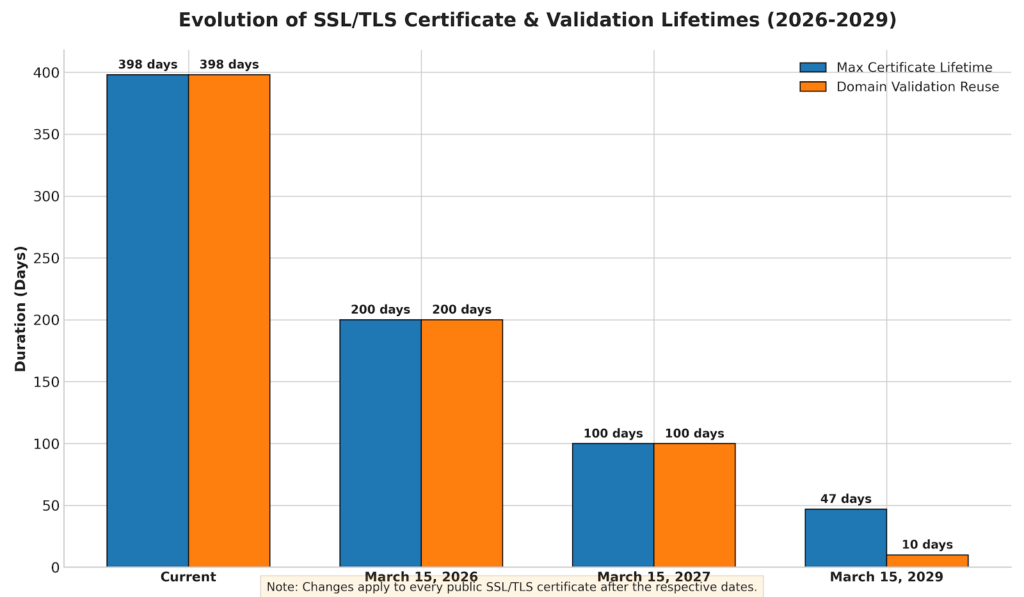
March 15, 2026: Maximum certificate lifetime drops to 200 days. Domain validation data can only be reused for 200 days.
March 15, 2027: Maximum lifetime drops to 100 days. Domain validation reuse drops to 100 days.
March 15, 2029: Maximum lifetime hits 47 days. Domain validation data can only be reused for 10 days.
The clock is already ticking on that first deadline. If you purchase a certificate before March 15, 2026, you can still get the current 398-day maximum. After that date, the new limits apply to every public SSL/TLS certificate.
Why Shorter Lifespans? The Security Argument
Shorter certificate lifespans might seem like bureaucratic overkill. But there’s solid reasoning behind the change.
When a certificate gets compromised, shorter lifespans reduce the exposure window. Instead of a vulnerable certificate lingering for over a year, it essentially “self-destructs” faster. That’s a meaningful security improvement.
There’s also the quantum computing factor. Post-quantum cryptography (PQC) is coming, and when those new encryption standards roll out, certificates will need updating more frequently anyway. The CA/B Forum is essentially forcing the infrastructure changes now, so the industry is ready when quantum-safe algorithms arrive.
And honestly? The current system wasn’t working. CyberArk’s 2025 State of Machine Identity Security Report found that 72% of organizations experienced at least one certificate-related outage in the past year. A third suffered multiple outages.
Longer certificate lifespans were giving teams a false sense of security—then catching them off guard when renewals slipped through the cracks.
The Real Cost of Getting This Wrong
Certificate outages aren’t just embarrassing. They’re expensive.
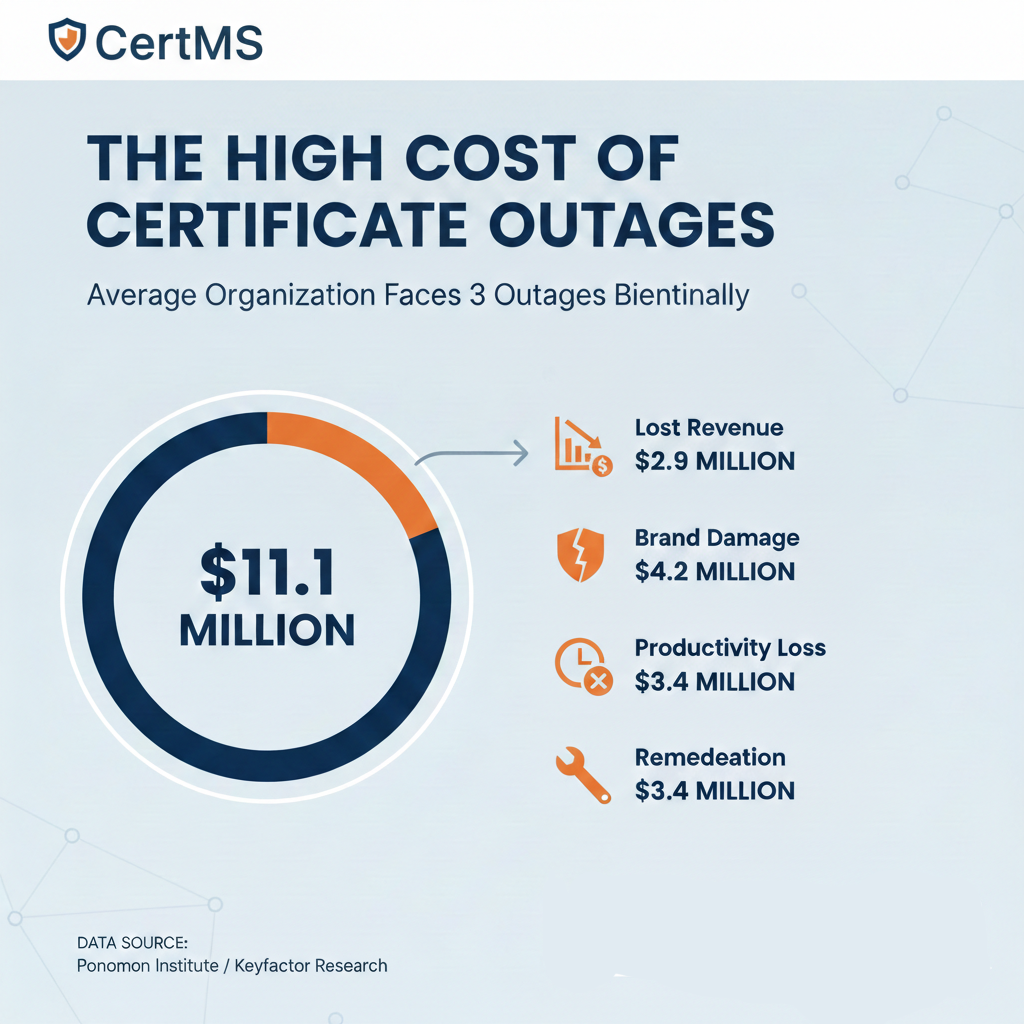
According to research from the Ponemon Institute and Keyfactor, the average organization experiences three certificate-related outages every two years. Each incident costs an estimated $11.1 million when you factor in:
-
- Lost revenue: Nearly $3 million in immediate revenue loss
-
- Brand damage: $4.2 million in reputation costs
-
- Productivity loss: $3.4 million in wasted time
-
- Remediation: $3.4 million to fix the problem
And that’s with the current 398-day certificate lifespans.
The Bank of England learned this lesson twice in 2024. In January, an expired certificate took down their RTGS system for 39 minutes, halting CHAPS and CREST settlements. Then in July, another certificate-related outage stopped their automated payment system for over 90 minutes.
SpaceX’s Starlink went down for hours in 2023 because of an “expired ground station certificate.” Google Voice experienced a four-hour global outage in 2021 from an expired TLS certificate. LinkedIn has had two certificate outages in the past two years.
These are sophisticated tech organizations with massive IT budgets. If they’re getting caught by certificate expirations, what chance does a smaller team have when renewal frequency jumps by twelve times?
What This Means for Your Team’s Workload
Let’s do some quick math.
Managing a single certificate manually takes about four hours when you account for tracking, validation, issuance, deployment, and documentation. If your organization manages 500 certificates (a modest number for mid-sized companies), that’s roughly 2,000 hours of renewal work per year with current 398-day lifespans.
Under the 47-day maximum by 2029, that same 500 certificates becomes over 15,000 hours annually. That’s the equivalent of seven full-time employees doing nothing but certificate renewals.
The average enterprise manages around 25,000 certificates. Some have 55,000 or more. At those scales, manual management isn’t just impractical—it’s impossible.
And here’s the part that keeps IT leaders up at night: it’s not just the time. It’s the complexity. With 47-day certificates, you’ll have renewals coming due constantly. Miss one, and you’ve got an outage. Miss several, and you’ve got a crisis.
Five Steps to Prepare Before March 2026
You’ve got roughly eight weeks until the first deadline. Here’s what to prioritize.
1. Build a Complete Certificate Inventory
You can’t manage what you don’t know about. The first step is discovering every certificate in your environment.
This includes:
-
- Certificates issued by your internal Windows Certificate Authority
-
- Certificates on Windows and Linux servers
-
- Certificates protecting public-facing URLs
-
- Third-party certificates from external CAs
-
- Certificates in cloud environments and containers
Many organizations are shocked when they audit their certificate inventory. That “couple hundred certificates” often turns into thousands spread across servers, applications, and services that nobody was tracking.
CertMS Features support certificate discovery
2. Map Certificates to Infrastructure
Knowing you have an expiring certificate is only half the battle. You also need to know where that certificate lives and what systems depend on it.
When a certificate on your internal CA expires, which servers are affected? If a web application certificate lapses, which services go down?
Creating these associations now—before you’re in crisis mode—means you can respond quickly when alerts fire. You’ll know exactly which systems to update and can prioritize based on business impact.
3. Implement Automated Monitoring and Alerting
Manual calendar reminders don’t scale. With 47-day certificate lifespans, you need automated systems that:
-
- Track every certificate’s expiration date
-
- Send tiered alerts (30, 14, 7, and 1 day before expiration)
-
- Integrate with your existing workflows (help desk systems, Slack, email)
-
- Provide dashboards showing upcoming expirations at a glance
The goal is eliminating surprises. When a certificate is about to expire, multiple people should know about it with plenty of lead time to act.
CertMS Features support alerting and reporting
4. Document Your Renewal Processes
Different certificates have different renewal procedures. That web server certificate might need a CSR generated, submitted to a CA, validated, and then deployed across a load balancer. Your internal PKI certificates might auto-enroll through Group Policy.
Document these processes now while you have time. Better yet, store that documentation alongside the certificates themselves so anyone handling a renewal has immediate access to the steps involved.
This becomes critical when the person who “always handles that certificate” is on vacation and something expires.
5. Evaluate Automation Options
Full automation isn’t always possible—internal processes, vendor limitations, and security requirements can get in the way. But anywhere you can automate certificate renewal, you should.
Look for tools that support:
-
- ACME protocol for automated public certificate renewal
-
- Integration with your existing Certificate Authorities
-
- API access for custom automation
- Webhook support for triggering external workflows
Even partial automation dramatically reduces the burden. If you can automate 60% of your certificates, you’ve cut your manual workload by more than half.
What About Internal Certificates?
Here’s some good news: the CA/B Forum rules only apply to publicly trusted certificates. If you’re running an internal PKI for development environments, internal applications, or non-public systems, you can set whatever lifespans you want.
That said, many organizations are using this as an opportunity to standardize on shorter lifespans across all certificates. The security benefits apply equally to internal certificates, and building good habits now makes the transition easier.
If your internal Windows Certificate Authority is issuing certificates with multi-year lifespans, consider whether that’s still the right approach—even though it’s not required.
The Bottom Line
47-day certificate lifespans aren’t a distant problem. The first reduction hits in March 2026, and every year after brings shorter windows and less room for error.
Organizations that start preparing now will barely notice the transition. Their monitoring catches expirations early. Their documentation makes renewals straightforward. Their automation handles the increased volume.
Organizations that wait will face mounting outage risks, exhausted teams, and the very real possibility of becoming the next headline about a certificate-related service disruption.
The work required to get certificate management under control is front-loaded. But it’s a lot less painful than explaining to your CEO why the website went down because someone forgot to renew a certificate.
Ready to stop worrying about certificate expirations? CertMS discovers, tracks, and alerts on every certificate across your infrastructure—from Windows CAs to Linux servers to public URLs. See exactly what’s expiring, where those certificates live, and get notifications before problems happen.
Request a Free CertMS Trial today
Word count: 1,742